

Ticket Summarizer - Synthreo Pylon
Ticket Summarizer agent guide - generate structured company-level and ticket-level summaries from ConnectWise Manage to help account managers quickly identify trends and issues.
Introduction
Section titled “Introduction”This agent assists account managers by providing structured summaries of support tickets. It can summarize all tickets for a company or generate a narrative for a specific ticket.
By querying the ConnectWise Manage API, the agent identifies tickets requiring attention, highlights trends, and creates actionable insights.
Goal: Streamline the account manager’s workflow, enabling quick decision-making and better client management.
Target Audience: Account managers who need an overview of ticket statuses, trends, or specific ticket history.
Features
Section titled “Features”The agent provides the following key functionalities:
Company-Level Summaries
Section titled “Company-Level Summaries”- Open Tickets - Identifies tickets that have been open for an unusually long time.
- High Logged Hours - Highlights tickets with significant time logged.
- Negative Sentiment - Flags tickets with customer notes or feedback indicating dissatisfaction.
- Critical Priority - Lists tickets marked as critical.
- Trends and Patterns - Observes and reports recurring issues or trends across tickets.
Ticket-Level Summaries
Section titled “Ticket-Level Summaries”- Accepts a specific ticket number.
- Reads and analyzes all ticket notes and updates.
- Provides a narrative summary of what happened in the ticket.
- Extracts key details in structured format:
- Company Name
- Contact Name
- Ticket Number
- Ticket Summary
- Ticket Sentiment (narrative of notes)
- Date Entered
- Ticket Status
Prerequisites
Section titled “Prerequisites”Before using the Ticket Summarizer, confirm the following:
- A ConnectWise Manage API token has been generated with access to
companies,tickets,notes, andtime entries. Contact your ConnectWise Manage administrator if you need a token issued. - The ConnectWise Manage API connection is configured in Synthreo Pylon with the correct base URL and credentials for your ConnectWise instance.
- The account manager using the agent has the company names or ticket numbers they want to query.
How to Use the Agent
Section titled “How to Use the Agent”Querying by Company
Section titled “Querying by Company”To get a company-level summary, provide the company name as it appears in ConnectWise Manage.
Input format:
Give me ticket details about [company name].
The agent queries active tickets for that company from the last 14 days, then generates a structured summary.
Querying by Ticket Number
Section titled “Querying by Ticket Number”To get a ticket-level narrative, provide the ticket number.
Input format:
Summarize ticket #[ticket number].
The agent retrieves the full ticket record including all notes and generates a structured narrative summary with sentiment analysis.
Usage Examples
Section titled “Usage Examples”Example 1: Company-Level Ticket Summary
Section titled “Example 1: Company-Level Ticket Summary”Input:
Give me ticket details about companyXYZ.
Output:
- Open Tickets: 3 tickets open for over 10 days.
- High Logged Hours: 2 tickets with over 20 hours logged.
- Negative Sentiment: 1 ticket flagged with negative feedback.
- Critical Priority: 1 ticket marked as critical.
- Trends: Recurring issues with delayed responses.
Example 2: Ticket-Level Summary
Section titled “Example 2: Ticket-Level Summary”Input:
Summarize ticket #12345.
Output:
Company Name: ABC Corp Contact Name: John Doe Ticket Number: 12345 Ticket Summary: Printer repeatedly failed after firmware update; escalated to vendor support. Ticket Sentiment: Customer expressed frustration in early notes, but sentiment improved once resolution steps were in place. Date Entered: 2023-09-12 Ticket Status: Closed
Example 3: Identifying Trends Across Open Tickets
Section titled “Example 3: Identifying Trends Across Open Tickets”Input:
Give me ticket details about Acme Industries.
Output:
- Open Tickets: 5 tickets open for over 7 days, 2 open for over 21 days.
- High Logged Hours: 1 ticket with 34 hours logged - network infrastructure review.
- Negative Sentiment: 2 tickets flagged. Customer notes reference repeated follow-ups with no resolution update.
- Critical Priority: 0 tickets currently critical.
- Trends: Three of five open tickets relate to VPN connectivity. This is a recurring pattern over the past two weeks and may indicate an underlying infrastructure issue.
Example 4: Recently Resolved Ticket with Mixed Sentiment
Section titled “Example 4: Recently Resolved Ticket with Mixed Sentiment”Input:
Summarize ticket #98765.
Output:
Company Name: Greenfield Manufacturing Contact Name: Sarah Kim Ticket Number: 98765 Ticket Summary: Email delivery failures affecting the entire domain; resolved after DNS record correction. Ticket Sentiment: Initial notes reflect urgency and frustration as email was unavailable for approximately four hours. Sentiment shifted positively after the technician communicated the root cause and applied the fix. The final note from the contact confirmed the issue was resolved and thanked the team. Date Entered: 2024-02-14 Ticket Status: Closed
Backend Architecture
Section titled “Backend Architecture”The Ticket Summarizer agent is built using a branching workflow, allowing it to handle both company-level and ticket-level requests.
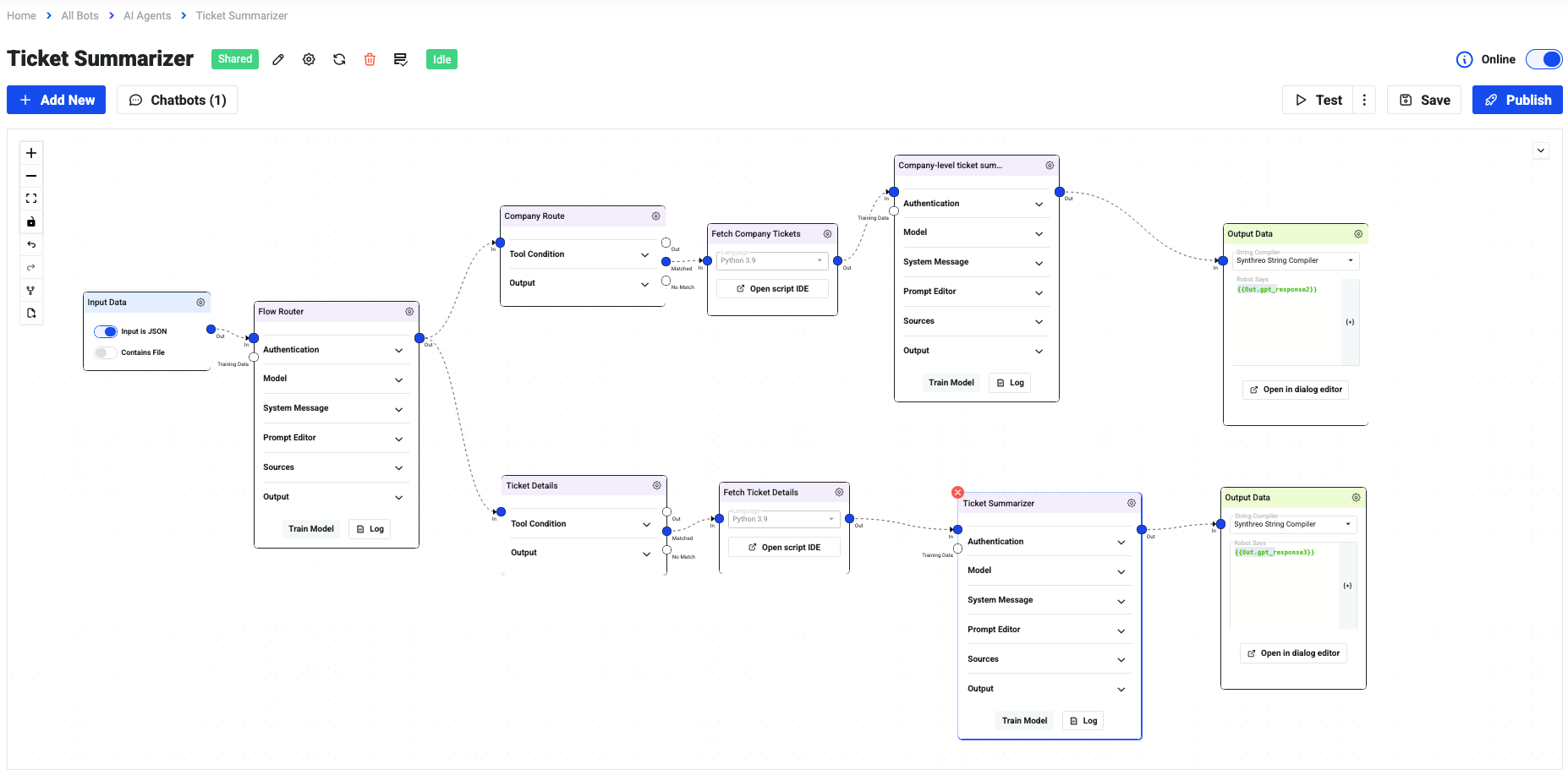
How it works:
-
Input Data (JSON)
- Receives user query (company name or ticket number).
-
Flow Router
- Determines if the query is a company-level request or a ticket-level request.
Company-Level Route
Section titled “Company-Level Route”-
Fetch Company Tickets (Python 3.9)
- Queries ConnectWise Manage API for active company tickets (last 14 days).
- Retrieves details: priority, status, logged hours, notes, time entries.
-
Company-Level Summarizer (OpenAI)
- Generates structured insights:
- Open tickets by age
- High logged hours
- Negative sentiment
- Critical priority tickets
- Trends and patterns
- Generates structured insights:
-
Output Data (Synthreo String Compiler)
- Formats the results into a conversational, structured summary.
Ticket-Level Route
Section titled “Ticket-Level Route”-
Fetch Ticket Details (Python 3.9)
- Queries ConnectWise Manage API for a specific ticket.
- Retrieves metadata and notes (company, contact, status, dates, updates).
-
Ticket Summarizer (OpenAI)
- Reads ticket notes and produces a narrative + structured fields:
- Company Name
- Contact Name
- Ticket Number
- Ticket Summary
- Ticket Sentiment
- Date Entered
- Ticket Status
- Reads ticket notes and produces a narrative + structured fields:
-
Output Data (Synthreo String Compiler)
- Returns an easy-to-read, client-ready summary.
Key Benefits
Section titled “Key Benefits”- Flexible - Handles both company and ticket queries seamlessly.
- Modular - Each branch (company vs. ticket) can be maintained or extended independently.
- Client-focused - Ensures summaries are structured, readable, and actionable.
Key Notes
Section titled “Key Notes”- Supports both company-level and ticket-level summaries.
- Workflow combines Python scripts and OpenAI modules for real-time insights.
- Modular design enables easy debugging and scalability.
- The company-level route retrieves tickets from the last 14 days by default.
Troubleshooting
Section titled “Troubleshooting”Issue: The agent returns no results for a company name.
Check:
- Confirm the company name matches exactly how it appears in ConnectWise Manage. The query is case-sensitive.
- Verify the company has active tickets within the last 14 days.
- Confirm the API token has read access to the
companiesandticketsendpoints.
Issue: Ticket notes are missing from the ticket-level summary.
Check:
- Confirm the API token has access to the
notesendpoint. - Verify the ticket number is correct and exists in ConnectWise Manage.
Issue: Sentiment analysis results seem inaccurate.
Check:
- Sentiment is determined by LLM analysis of ticket notes. Very short notes or notes with minimal language context may produce uncertain or neutral results.
- Review whether the ticket notes contain customer-authored language. Technician-only internal notes may not carry sufficient customer sentiment signals.
If you encounter issues not covered here, contact: help@synthreo.ai
Q: What if I do not have an API token?
A: Contact your ConnectWise Manage administrator to generate a token with the required permissions. It must include access to: companies, tickets, notes, and time entries.
Q: Can the agent summarize tickets for multiple companies at once?
A: No, it currently supports only one company or ticket at a time.
Q: How does the agent determine negative sentiment?
A: The agent uses OpenAI with prompt-based instructions to evaluate ticket notes and feedback. It looks for negative language patterns (for example frustration, dissatisfaction, complaints) and flags tickets accordingly.
Q: Can I adjust the lookback window beyond 14 days?
A: The default lookback window for company-level queries is 14 days. Adjusting this requires a change to the Python fetch script in the Company-Level Route. Contact your administrator or the ProServ team to modify this value.