

ThreoAI Studio Overview
Studio is the ThreoAI hub for building Experts, running shared Pylon agents, managing Connectors and Skills under Capabilities, and setting up Projects.
Overview
Section titled “Overview”Studio is where you create the building blocks. Once they exist, they show up across chat, projects, and the explore catalog.
Open Studio from the left sidebar. There are tabs for Overview, Experts, Agents, Capabilities, Projects, and Aliases. You never have to open Studio to chat. Go there when you want to make something you will reuse, such as an Expert, a connected app, a skill, or a project, and then pull it into a conversation later.
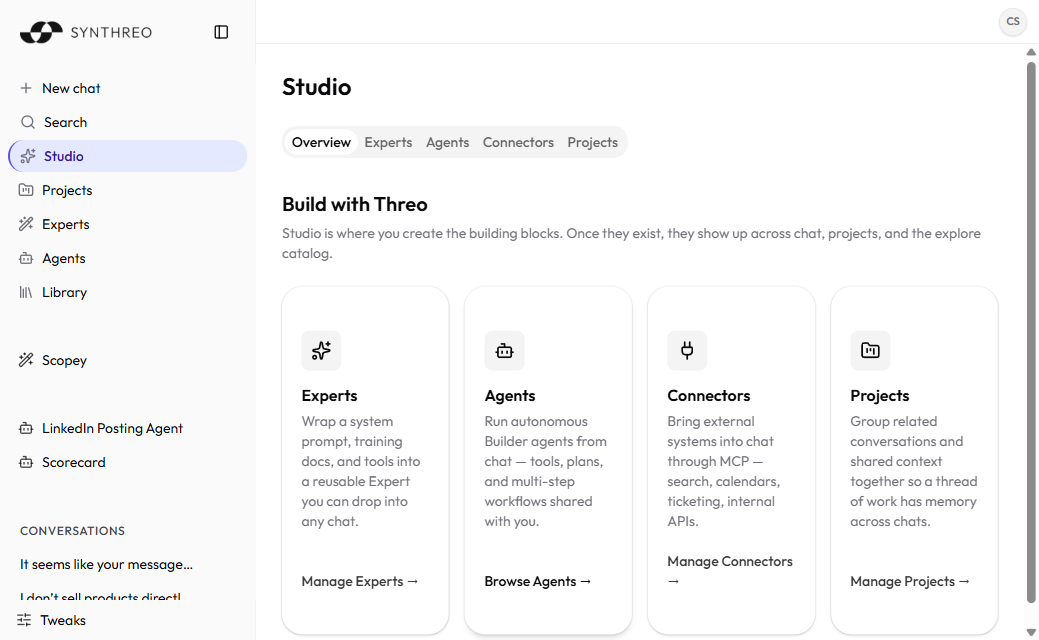
The Overview tab is a set of launch cards for the main sections. Aliases has no card of its own; reach it from the tab row.
The building blocks
Section titled “The building blocks”| Tab | What you build | Where it shows up |
|---|---|---|
| Experts | A reusable assistant with its own instructions, training docs, and actions | Any chat, plus the Experts catalog |
| Agents | Nothing - it lists the Pylon agents shared with you so you can run them | The chat composer and the sidebar |
| Capabilities | Connectors (external systems over MCP) and Skills (packaged know-how) | Any chat |
| Projects | A home for related conversations and shared context | The sidebar and chat |
| Aliases | Short @ names that point at an agent, Expert, or DAG | The chat message box |
Experts
Section titled “Experts”Wrap a system prompt, training docs, and tools into a reusable Expert you can drop into any chat. Set one up once, hand it to your team, and pick it when you start a conversation. The tab lists Experts you own plus any shared with you, with Edit and Delete on the ones you own.
See Creating an Expert to build one.
Agents
Section titled “Agents”The Agents tab is a read-only list of Pylon agents shared with you. You can pin one to the sidebar or launch it in chat from here; editing happens in Pylon, not in ThreoAI.
For how agents get built, see the Pylon Overview.
Capabilities
Section titled “Capabilities”Capabilities holds two sub-tabs:
- Connectors - external systems brought into chat over MCP: search, calendars, ticketing, internal APIs.
- Skills - packaged know-how (a SKILL.md) that the model loads on its own when your request matches.
Each sub-tab is enabled separately by your organization, so you may see one, both, or neither. When neither is enabled the Capabilities tab does not appear at all. See Connectors and Skills in ThreoAI.
Projects
Section titled “Projects”Group related conversations and shared context together so a thread of work has memory across chats. One project holds the files and history for one effort.
See ThreoAI Projects to set one up.
Aliases
Section titled “Aliases”An alias is a short name for an agent, Expert, or DAG. Agent and Expert aliases can be used in chat by typing @ followed by the alias, for example @rex. Create one with New Alias: give it an alias name, pick the target type, and choose the target. Agents and Experts are picked from a dropdown; a DAG is entered by its numeric id from Pylon, because ThreoAI has no DAG list yet.
How building blocks reach chat
Section titled “How building blocks reach chat”Nothing you build in Studio stays stuck there. Save an Expert and it appears in the Experts catalog under Explore, and in the sidebar once you pin it. Add a Connector and chat can use it. An Agent someone shares with you turns up in the composer. Projects gather the chats that belong to one effort.
Build it once. Use it anywhere you chat.
Frequently Asked Questions
Section titled “Frequently Asked Questions”Where do I find Studio in ThreoAI? Open Studio from the left sidebar. It has tabs for Overview, Experts, Agents, Capabilities, Projects, and Aliases.
Where did the Connectors and Skills tabs go? They are sub-tabs inside Capabilities now. Open Studio, select Capabilities, then choose Connectors or Skills.
Why is the Capabilities tab missing? Connectors and Skills are each turned on per organization, and Capabilities appears only when at least one of them is enabled for your company. If you see the tab with only one sub-tab, the other feature is not enabled. Ask your administrator.
Do I have to use Studio to start a chat? No. Studio is for building reusable pieces. You can chat without ever opening it, and anything you build there is ready when you want it.
Are Agents the same as Experts? No. Experts are assistants you configure here in Studio. Agents are built in Pylon and shared with you; the Agents tab only lists the ones you can run.
Related
Section titled “Related”- Creating an Expert - build an Expert with instructions, training documents, and actions
- Connectors - bring external apps into chat over MCP
- Skills in ThreoAI - turn on or upload know-how the model loads automatically
- ThreoAI Projects - group related chats and shared context
- Pylon Overview - build the Agents behind Expert actions